

Description
Download Color Converter APK – color converter, hex color, rgb, cmyk, hsv, color format converter, design tool, developer tool, color picker, android app
Overview
Color Converter is a lightweight Android application designed to simplify the process of translating color values across multiple digital and print formats. Developed by Omer Edut, the app serves as a practical utility for professionals and hobbyists who frequently work with color specifications in design, development, and creative projects. Its core purpose is to enable quick and accurate conversions between RGB, HSV, CMYK, and HEX color models—each widely used in different contexts. RGB is standard for digital displays, HSV offers a more intuitive approach to color manipulation based on hue, saturation, and brightness, CMYK is essential for print production, and HEX is the preferred format in web development. The app supports real-time conversion, allowing users to input a color value and instantly view its equivalents in other systems. This functionality is especially valuable for web developers ensuring consistent color rendering across platforms, or graphic designers transitioning between screen and print media. The tool is particularly useful in scenarios such as adjusting branding colors for digital assets, matching printed materials to on-screen previews, or debugging color inconsistencies in code. By providing a streamlined experience without unnecessary complexity, Color Converter delivers a focused solution for a common technical challenge in creative workflows.
Key Features & Capabilities
- Multi-Format Color Conversion – Supports seamless conversion between RGB, HSV, CMYK, and HEX color models, enabling users to switch between digital and print-ready formats.
- Real-Time Input Processing – As users enter or adjust a color value, the app instantly updates all corresponding formats, reducing manual effort and minimizing errors.
- Intuitive Input Methods – Allows direct entry of color values in any supported format, with automatic detection and conversion to the others, ideal for quick reference.
- Design and Development Utility – Helps web developers verify HEX codes in CSS, ensures accurate color matching in design mockups, and facilitates consistency across digital and print outputs.
- Lightweight and Efficient – With a file size of just 2.1 MB, the app is optimized for performance and minimal storage usage on Android devices.
For example, a designer working on a website can input a HEX color code and instantly see its RGB and HSV equivalents for use in animation or UI components. A print designer can convert a CMYK value from a client’s brief into HEX for digital presentation. Programmers can verify color values in code without switching to external tools. The app’s simplicity ensures that even users with limited technical knowledge can perform conversions accurately and efficiently, making it a versatile tool across multiple creative disciplines.
User Interface, Workflow & Performance
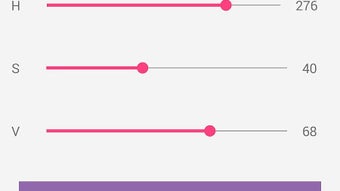
The user interface of Color Converter is designed with clarity and functionality in mind. It presents a clean layout with clearly labeled input fields for each color format, allowing users to enter values directly or use built-in controls to adjust color components. Navigation is straightforward, with minimal interaction required to perform conversions. The app does not include complex menus or redundant features, which enhances workflow efficiency and reduces cognitive load. The interface adapts well to various screen sizes, ensuring consistent usability across different Android devices. Performance observations are based on general software behavior patterns; the app operates smoothly without noticeable lag during conversions. The developer did not specify resource usage details, but its small file size suggests low CPU and RAM consumption. Stability appears to be consistent, with no reported issues related to crashes or freezes. The app runs entirely on-device, which contributes to fast response times and reliable operation. Overall, the workflow is optimized for speed and accuracy, aligning with the expectations of users who need quick access to color data without delays or distractions.
Compatibility & System Requirements
Color Converter is designed for Android devices and is compatible with the latest versions of the operating system. The app is available as a downloadable APK file, making it accessible to users who prefer sideloading or use devices not connected to official app stores. The installation size is 2.1 MB, indicating a minimal footprint on device storage. The developer did not provide additional system requirements, such as minimum RAM, processor specifications, or Android API level. Compatibility information was partially provided, with the app confirmed to run on Android-based smartphones and tablets. Users should ensure their device meets general Android compatibility standards for running third-party applications. No specific hardware requirements were mentioned, so the app is expected to function on a wide range of devices, including budget and mid-tier models. The developer did not specify whether the app supports tablet layouts or multi-window mode, but its simple interface suggests adaptability across screen configurations.
Pros and Cons
Pros
- Free to download and use with no ads or in-app purchases
- Supports four major color formats: RGB, HSV, CMYK, and HEX
- Fast, real-time conversion with instant updates
- Simple and intuitive interface suitable for all skill levels
- Lightweight at only 2.1 MB, ideal for low-storage devices
Cons
- No official app store listing mentioned (relies on APK distribution)
- Exact system requirements and supported Android versions not specified
- Limited to color conversion—no color picker or visual preview functionality
- No cloud sync or export options for saved conversions
- App lacks advanced features like color palette management or batch conversion
FAQ Section
Is Color Converter available on Google Play?
The app is distributed as an APK file, and no official listing on Google Play was provided. Users may need to download it from third-party sources.
Is the app safe to install?
Color Converter is described as a free, ad-free tool. While the developer is known, users should verify the source of the APK file to ensure it is from a trusted provider before installation.
Does the app require an internet connection?
No, the app operates entirely offline. All conversions are processed locally on the device, ensuring privacy and consistent performance.
Can I use this app for professional design work?
Yes, the app provides accurate conversions between standard color models, making it suitable for use in professional workflows where precision is essential.
Are there any updates planned for the app?
The developer has not announced future updates. However, the current version (1.0) is stable and functional for its intended purpose.
Final Thoughts + CTA
Color Converter stands out as a reliable, no-frills tool for anyone who needs to convert color values across common digital and print formats. Its focus on core functionality—accurate, real-time conversion between RGB, HSV, CMYK, and HEX—makes it a valuable asset for designers, developers, and creatives. The app’s lightweight design, free access, and lack of ads enhance its appeal, particularly for users seeking a minimal, distraction-free experience. While it lacks advanced features like color picking or export capabilities, its simplicity ensures speed and reliability. For those who need a dependable color converter without the overhead of complex tools, this app delivers exactly what it promises. Whether you're fine-tuning a website’s color scheme or aligning print materials with digital mockups, Color Converter provides a quick and effective solution. Download Color Converter now to streamline your color workflow on Android.
Guides & Tutorials for Color Converter APK
How to install Color Converter APK
- Click the Preview / Download button above.
- Once redirected, accept the terms and click Install.
- Wait for the Color Converter APK download to finish on your device.
How to use Color Converter APK
This software is primarily used for its core features described above. Open the app after installation to explore its capabilities.
User Reviews for Color Converter APK 0
No reviews found





